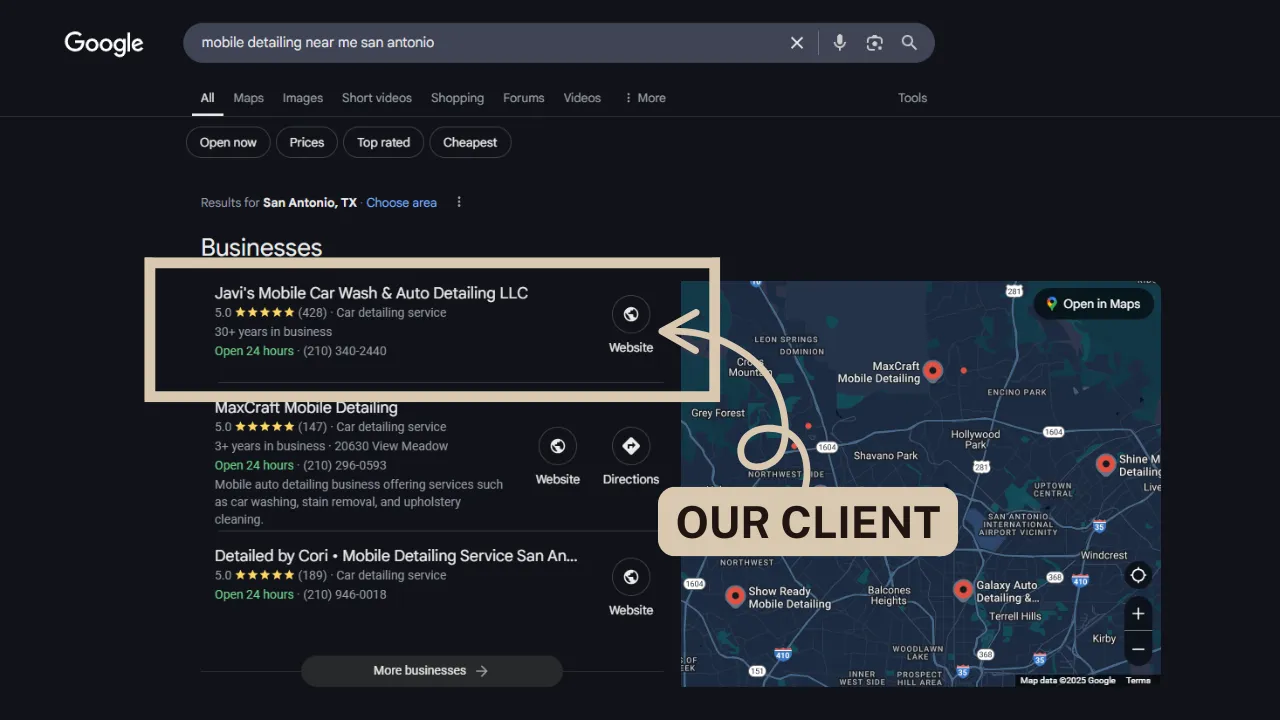
Quick answer
Google shows businesses in Maps based on relevance, distance from the searcher and how well known they are. If yours is missing, it's usually an unverified or suspended profile, a recent edit under review, the wrong category, too few reviews, or a weak website. Check whether the profile is gone or just ranking low, then work through the fixes below.
In this article
- First: is your business really missing?
- 1. Is your profile verified?
- 2. Was your profile suspended?
- 3. Did you just make changes?
- 4. Are you a service-area business with a hidden address?
- 5. Are you too far from the person searching?
- 6. Is your primary category right?
- 7. Is your business name clean?
- 8. Is your profile complete?
- 9. Do you have enough reviews, and recent ones?
- 10. Does your website back up your profile?
- 11. Do you have duplicate listings?
- 12. Is your profile active?
- How long does it take to show up after fixing these?
- Can I pay to show up on Google Maps?
- Frequently asked questions
- Want someone to handle this for you?
You set up your Google Business Profile, you know people are searching for what you do, and yet your business is nowhere to be found. Your competitor down the street shows up. You don't.
The short answer: Google shows a business in Maps and local results based on three things: how relevant it is to the search, how close it is to the person searching, and how well known it is. If your profile isn't verified, is under review, or is weak on any of those three, it can disappear from the results even though it technically exists.
Below are the 12 most common reasons, how to tell which one is yours, and what to do about each.
First: is your business really missing?
Before you fix anything, check whether the profile is gone or just ranking low. They're different problems.
- Search your exact business name on Google Maps. If it comes up, your profile is live and the problem is ranking, not visibility.
- Search the way a customer would, like "plumber near me" or "roof repair San Antonio." If you don't show up for those, you have a ranking problem (reasons 5 through 12 below).
- Search from a different spot. Results change block by block. Searching from your own office isn't the same as a customer searching from across town.
- Use a private browser window so your own search history doesn't skew the results.
If even your exact name doesn't show up, start with reasons 1 through 4.
1. Is your profile verified?
An unverified profile won't show up in Maps or search. Sign in at business.google.com. If you see a prompt to verify, Google hasn't confirmed the business yet.
The fix Finish verification. Google decides the method: often a short video showing your signage, your work vehicle or equipment, and proof you run the business. Follow the prompts exactly, record in one continuous take, and don't change your profile details while verification is pending.
2. Was your profile suspended?
If your profile used to show up and suddenly vanished, it may have been suspended. You'll usually see a notice when you sign in.
The most common causes are a business name stuffed with keywords ("Joe's Plumbing San Antonio Best Water Heater Repair"), an address Google doesn't accept (a post office box, a virtual office or a mailbox store), or several profiles for the same business.
The fix Correct whatever broke the rules, then request reinstatement from the notice in your profile. Be honest and attach proof, like a business license or utility bill. Don't create a new profile while the old one is suspended, because that counts as a duplicate and makes things worse.
3. Did you just make changes?
Editing your business name, address, category or phone number can send the profile back into review. During that time it may stop showing up or show the old details.
The fix Wait a few days before changing anything else. Making edit after edit restarts the review and can trigger re-verification.
4. Are you a service-area business with a hidden address?
If you go to your customers (plumbers, roofers, cleaners, mobile detailers), Google lets you hide your address and list service areas instead. That's allowed and you can still rank, but Google still uses the location you verified with to decide who's "close."
The fix Nothing to fix if this is set up correctly. Just know that listing far-off cities as service areas won't make you show up there. Your website's city pages do that job.
5. Are you too far from the person searching?
Distance is the one factor you can't change. If someone searches "electrician near me" five miles from your verified location, Google will usually show businesses closer to them first.
The fix You can't move the pin, but you can make up for distance by being more relevant and more prominent, which is what the rest of this list covers. Running Google Ads is the other way to show up in areas you can't reach organically.
6. Is your primary category right?
Your primary category is one of the strongest signals Google uses for relevance. A roofer listed as "Contractor" or a marketing agency listed only as "Consultant" is telling Google the wrong thing.
The fix Pick the most specific primary category that matches your main service, like "Roofing contractor," "HVAC contractor" or "Plumber." Then add a few secondary categories for the other things you do. Look at what the top businesses in your area use for ideas.
7. Is your business name clean?
It's tempting to add keywords and a city to your business name. It might even work for a while. It's also against Google's rules and one of the fastest ways to get suspended or reported by a competitor.
The fix Use your real business name, exactly as it appears on your signage, invoices and website.
8. Is your profile complete?
An empty profile gives Google little to work with. Check that you have:
- A description that explains what you do and where, in plain language
- Every service you offer, listed in the Services section
- Accurate hours (or clearly set as by appointment)
- Your website and booking link
- Real photos: your work, your team, your vehicles, your shop or office
The fix Fill in every section. It takes about an hour and is one of the easiest wins on this list.
9. Do you have enough reviews, and recent ones?
Reviews feed the "how well known are you" part of Google's ranking. A business with 80 recent reviews will usually beat one with 6 from two years ago, even if the second one does better work.
The fix Ask every happy customer for a review right after the job, with a direct link. A short text works best. Reply to every review, good or bad. Don't buy reviews, don't offer discounts for them, and don't have customers post from your phone or office Wi-Fi. Google filters those out, and sometimes it takes legitimate reviews with them when they arrive in a sudden burst.
10. Does your website back up your profile?
Google cross-checks your profile against your website and the rest of the web. If your website is outdated, missing your services, or lists a different phone number, that weakens your profile.
The fix Make sure your website lists the same business name, phone number and service area as your profile, has a page for each main service, and loads fast on a phone. Then check your listings on directories like Yelp, BBB and Facebook so the details match everywhere.
11. Do you have duplicate listings?
Old profiles from a previous address, a listing a former employee made, or one Google created automatically can compete with your real profile and split your reviews.
The fix Search Maps for your business name and phone number. If you find duplicates, request ownership and mark them as duplicates or closed, or ask Google support to merge them. Never delete a profile that has reviews without checking it isn't your main one.
12. Is your profile active?
Profiles that never change can slowly lose ground to competitors who keep theirs fresh.
The fix Post an update every week or two (a recent job, a tip, an offer), add new photos regularly, and keep your services and hours current. It's a small habit that keeps Google and customers seeing an active business.
How long does it take to show up after fixing these?
It depends on the problem. A completed verification or a reinstated profile can show up within days. Ranking improvements from better categories, reviews and a stronger website usually build over weeks to a few months. Anyone promising you the top spot in Maps by next week is guessing.
Can I pay to show up on Google Maps?
Not in the regular Maps results. Those are earned, not bought. You can pay for Google Ads, which can show your business as a sponsored result in Maps and search, and some trades can use Local Services Ads (the "Google Guaranteed" or "Google Screened" listings). Those are separate from your profile's ranking and work well alongside it.
Frequently asked questions
Why does my business show up on Google search but not on Google Maps?
Usually it's a ranking issue, not a missing profile. Search results and Maps use the same profile, but Maps leans harder on distance, so you may not appear for searchers who are farther away. Strengthening your category, reviews and website helps on both.
Why did my business disappear from Google Maps overnight?
The most common reasons are a suspension, a recent edit that sent the profile back into review, or a duplicate listing taking its place. Sign in at business.google.com and look for a notice first.
Does hiding my address stop me from showing up?
No. Service-area businesses with hidden addresses can still show up in Maps and local results. Google still uses your verified location to judge distance.
How many reviews do I need to show up on Google Maps?
There's no set number. What matters is how you compare to the other businesses showing up for the same search, plus how recent your reviews are. Check how many reviews the top three businesses in your area have and aim to close the gap steadily.
Want someone to handle this for you?
Managing your Google Business Profile is part of our Get Found plan: we build your website free, then manage it, your Google profile and your lead system for $250/mo, month to month. Every plan includes missed-call text-back and review requests after every job, so your reviews keep growing on their own. See what's included and our pricing, or read more about our local SEO service.
If you'd rather talk it through, book a strategy call and we'll look at your profile together.

Founder of Digitalized Elevation. Since 2023, we've helped contractors, home service companies and local businesses get more calls with websites, Google profiles, ads and SEO. More about us